
 PPPY
PPPYQuickstart
Three steps take you from nothing installed to a bimanual OpenArm you can drive from your browser. There is no repository to clone and no robot hardware to plug in: the arms, the grippers, and the physics all run in a MuJoCo simulation on your machine.
This page is a demo, not a tutorial. It exists so you can watch a peppy stack work end to end before you learn how one is put together. To learn how one is put together, start at Installation and work through the guides, which build a stack up node by node from an empty directory.
Peppy runs on Ubuntu 24.04 or later and the Linux distributions built on it, on Debian 13 or later (x86_64/aarch64, tested on Ubuntu 24.04), on Raspberry Pi OS (64-bit, based on Debian 13 or later), and on macOS (Apple Silicon). Of the Raspberry Pi boards, it runs on the Raspberry Pi 5, the Pi 500 and the Compute Module 5. Other Linux distributions, Fedora and Arch Linux among them, are not supported, and neither are Ubuntu 22.04, Debian 12, 32-bit systems and the older Raspberry Pi boards: the installer stops on them before it changes anything.
Step 1: Install peppy
Section titled “Step 1: Install peppy”-
Run the installer:
Terminal window curl -fsSL https://peppy.bot/install.sh | shIt drops the
peppyCLI on yourPATH, registers the background service that builds and supervises nodes, and configures the Apptainer container runtime the simulation nodes are built on. -
Confirm the CLI and the service are both there:
Terminal window peppy infoIt prints the CLI version and container setup, then a
Daemon Infoblock. That block is the background service answering, so seeing it means everything is up.To read just the CLI version without contacting the daemon, run
peppy --version(or-V); it prints the version alone from the binary itself.If your shell reports
peppy: command not found, apply thePATHupdate the installer printed (source ~/.bashrc, or whichever file it named) and run it again. Shells opened afterwards pick it up on their own.
Installation covers version pinning, skipping the service, and managing it afterwards.
Step 2: Launch the simulated robot
Section titled “Step 2: Launch the simulated robot”A launcher is one file listing the nodes that make up a robot, with the parts that vary (which simulation runs it, which control surface drives it) selected at launch time with --with. The launchers-hub launchers ship with peppy and the installer indexed them, so you can start openarm_simulation by name, swapping its simulation for MuJoCo; the file deploys one simulated OpenArm v2 named alpha, and the browser control panel is what the robot runs unless told otherwise:
peppy stack launch openarm_simulation --with mujocoThat single command adds, builds, and starts every node in the selection, in dependency order: four instances across four node types. The cast is the MuJoCo simulation; the robot’s initializer, which joins the robot into it as an OpenArm v2 and reports it ready once the simulation stands every limb; the backbone, which coordinates both arms and pairs each arm and gripper with the simulation; and the browser control panel. It prints Launch complete when the stack is up. alpha names this robot and prefixes its instance IDs, for example alpha_backbone_inst. Launch replaces the current stack; later joins add copies to it.
The command then returns; it is not a foreground supervisor. The nodes keep running under the peppy background service, so you can close that terminal without stopping them.
Step 3: Drive the arms
Section titled “Step 3: Drive the arms”Once the launcher prints Launch complete, open two browser tabs:
| Address | What it is |
|---|---|
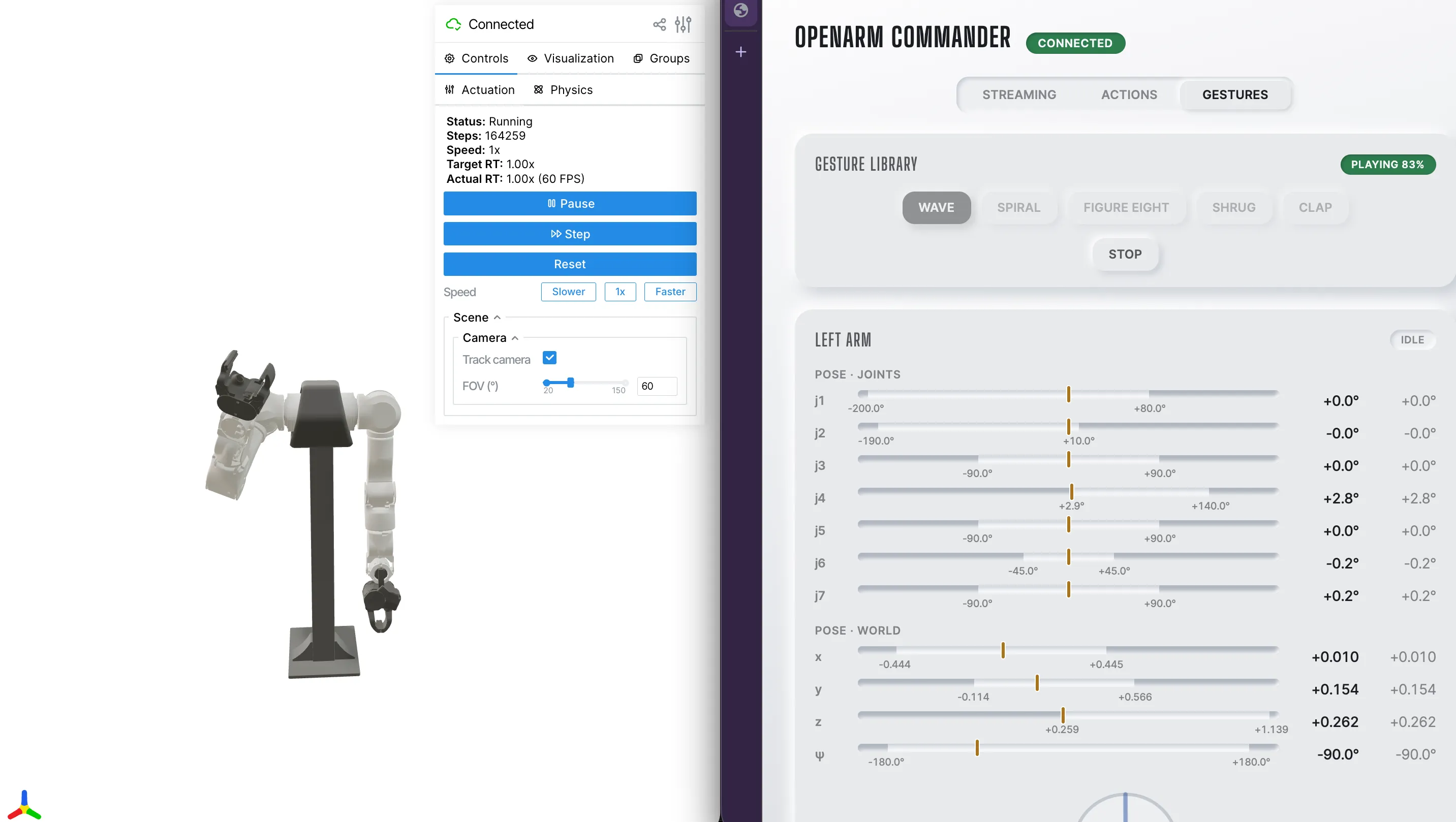
| http://localhost:8080 | the MuJoCo viewer, showing both arms in the simulated world |
| http://localhost:8765 | the openarm_web_commander control panel |
Put them side by side. The panel opens in Streaming mode, with a card per arm: press Enable on one, drag any of its joint sliders or its gripper slider, and that side follows your input live in the viewer. The mode switch has three more modes to try once the arms move: Actions for one governed move to a target you compose, Gestures for a baked choreography, and Motors for a read-only view of every motor’s health.
To shut things down, stop instances one at a time:
peppy node stop alpha_commander_instOr tear the whole stack down at once, which stops every instance and empties the stack:
peppy stack resetIf something doesn’t come up
The viewer or the panel won’t load. The simulation keeps initializing for a moment after Launch complete. Give it a few seconds, then run peppy stack list: every instance should read running under STATUS and healthy under HEALTH. To dig into one of them:
peppy node info sim_mujoco:v1It prints the instance’s state and health plus the path to its run log, which is the file to read when the state alone doesn’t explain the problem.
The panel won’t load and alpha_commander_inst is not running. Port 8765 is taken, usually by an earlier instance that is still up. Find it with peppy stack list and stop it with peppy node stop <instance_id>, then launch again.
The viewer isn’t on 8080. Something else holds that port, so the sim took the next free one. Read the port off the sim’s run log (peppy node info sim_mujoco:v1 prints its path), or pin one by setting viewer_port in the sim instance’s arguments (flatten the launcher to a file with peppy stack resolve openarm_simulation --with mujoco, edit it, and launch the file).
A build fails on Linux. Apptainer needs unprivileged user namespaces, which the installer normally configures. Check with peppy container status, and repair it with peppy container setup (see Containers).
The launch fails with Dependencies missing from nodes cache or nodes.json5 not found or empty. The local index is stale or was never populated. Run peppy repo refresh and launch again.
Where to go next
Section titled “Where to go next”You just ran a stack someone else assembled. To build your own:
- Installation: the full install reference, including service management
- Creating your first node: write and run a node from scratch, in Rust or Python
- Launch files: the launcher format behind the command you just ran
- Repositories: where peppy resolves node and launcher names from, and how to add your own
- Concepts: nodes, instances, contracts, and the stack, defined